
Disclosure: this guide to the best VPS for automated trading contains affiliate links. If you buy through them we may earn a commission at no extra cost to you. Prices were checked in September 2026 and are monthly-billing rates unless stated otherwise. We rank on specs and suitability, not commission.
The best VPS for automated trading is the one closest to your broker’s trade server with enough RAM to run your terminals without swapping — not the one with the flashiest latency number on its homepage. For most retail algo traders running one or two MetaTrader 5 terminals, that means a 4 GB, 2-core Windows VPS in London or New York for roughly $13–$30 per month. Futures and scalping strategies are the exception, and they belong in Chicago.
This guide is for traders who already have a working Expert Advisor or trading bot and now need it running 24/5 without their laptop being part of the trade. You’ll get the five specs that actually change your fill quality, a method to measure your real broker latency before you spend anything, and a side-by-side comparison of seven providers at real September 2026 prices. By the end you’ll know which is the best VPS for automated trading in your setup — which is a different question from which one has the best homepage.
Key takeaways
The short version, for anyone shopping for the best VPS for automated trading this month:
- Location beats raw speed. Matching your VPS region to your broker’s data centre (usually Equinix LD4 in London or NY4 in New York) does more for execution than doubling your CPU.
- 4 GB RAM is the practical floor for a Windows VPS running MetaTrader 5. 1–2 GB plans exist and are cheap, but Windows itself eats most of it.
- Cheapest credible specialist option: MetaTrader VPS at $15/month, dropping to $10/month on an annual term (MQL5).
- Best all-round retail pick: ForexVPS.net Core — $25.60/month for 4 GB RAM, 2 cores, 100 GB storage and 22 locations.
- Futures and CME-based algos: QuantVPS in Chicago, from $29.99/month, advertising 0.52 ms to the CME matching engine.
- Price is the last question. The best VPS for automated trading is chosen on geography first, RAM second, refund window third — and cost fourth.
- Latency below roughly 10 ms stops mattering for anything but scalping, news trading and high-frequency execution. Don’t pay for milliseconds your strategy can’t use.
Contents
- What a trading VPS actually does — and when you don’t need one
- The 5 specs that decide the best VPS for automated trading
- How to measure your real latency before you buy
- Best VPS for automated trading in 2026: 7 compared
- Which one should you pick?
- Extra considerations for prop firm traders
- The 12-point setup checklist
- Five mistakes that cost people money
- Frequently asked questions
What a trading VPS actually does — and when you don’t need one
Before comparing providers, it helps to be precise about what you are renting. A virtual private server for trading is a slice of a rack-mounted machine, running 24/7 in a data centre, that you connect to over Remote Desktop. Your MetaTrader terminal, cTrader instance or Python bot lives there instead of on your laptop.
Three things change when you move an EA off your own machine. Your strategy keeps running when your Wi-Fi drops, your laptop sleeps or the power goes out. Your orders travel a short, stable, wired path to the broker instead of crossing a residential ISP. And your platform stops competing for CPU with your browser and everything else you have open.
Those three changes are the entire case for a trading VPS. Everything else in this comparison is about picking the best VPS for automated trading that delivers them at your broker, at a price your account size can carry.
That last point matters more than traders expect. If your EA recalculates on every tick across six symbols while Chrome is holding 40 tabs, the delay you feel is your own machine, not the market.
You probably don’t need a VPS if you trade manually on the daily chart, or your EA only acts at a fixed hour and you can leave a desktop switched on. The honest test: would a two-hour outage at 3 a.m. cost you more than the annual price of a VPS? If not, skip it for now.
The 5 specs that decide the best VPS for automated trading
1. Location and latency to your broker’s server
This is the single decision that changes your fills, and it is why the best VPS for automated trading is a different server for a London-hosted forex broker than it is for a CME futures broker. Most retail forex and CFD brokers host their trade servers in a handful of financial-hub data centres — Equinix LD4 in Slough (London), Equinix NY4 in Secaucus (New Jersey), and Equinix TY3 in Tokyo. Futures brokers cluster around the CME’s Aurora, Illinois facility outside Chicago.
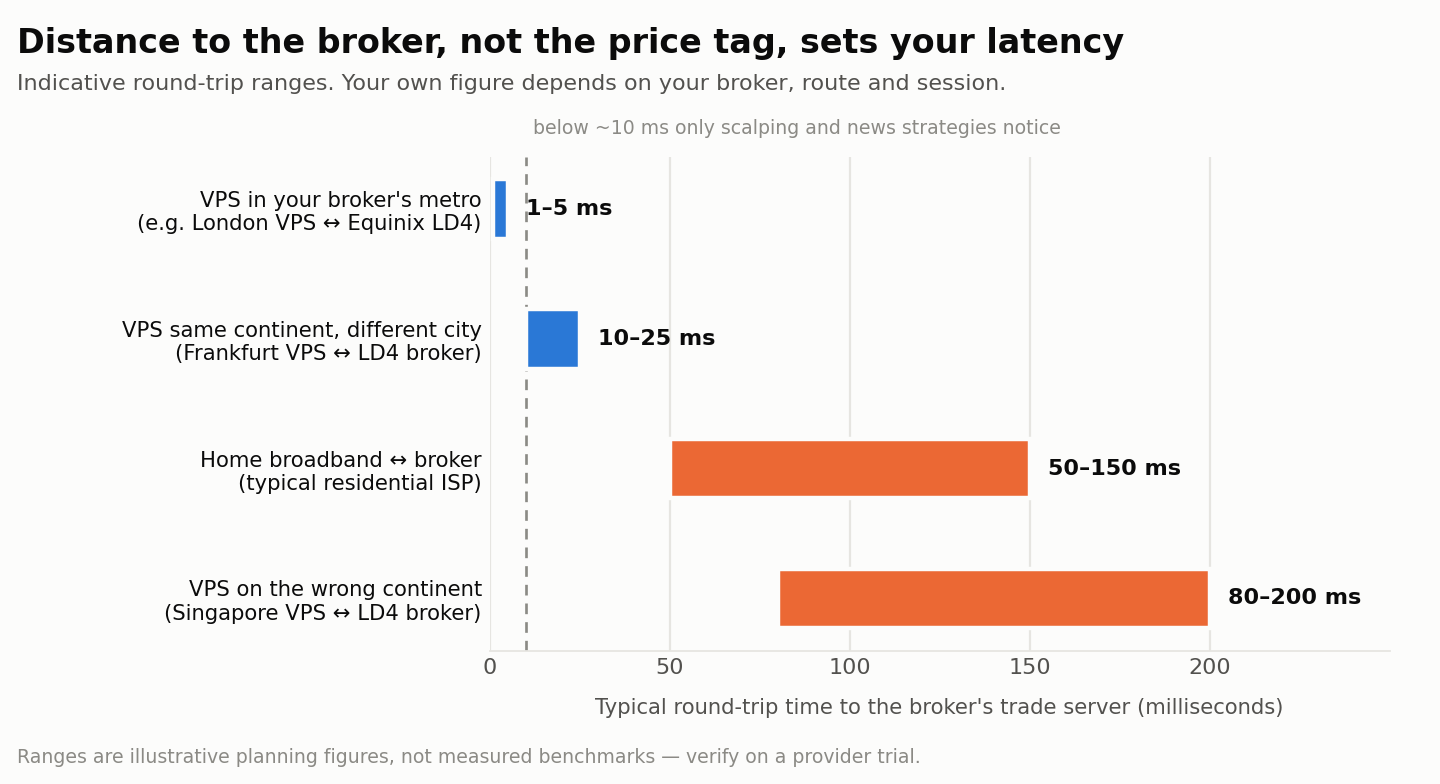
Put your VPS in the same metro as your broker’s server and round-trip times typically fall into the low single-digit milliseconds. Put it on the wrong continent and you’re adding 80–150 ms for no reason at all.
How much that costs you depends entirely on your strategy. As ForexBrokers.com notes in its VPS guide, latency proximity is “primarily relevant for scalping or high-frequency trading strategies rather than standard retail trading.” A swing EA that opens two positions a week will not notice the difference between 4 ms and 40 ms. A scalper working the spread on gold during the London open absolutely will.
2. RAM — and how to size it honestly
Windows Server itself consumes a meaningful share of a small VPS before MetaTrader even opens. That’s why the 1 GB and 1.5 GB plans you’ll see advertised for under $15 are false economy for anything more than a single terminal with a couple of charts.
Don’t guess — measure. MetaTrader 5 ships with a built-in Task Manager that shows memory consumed by each chart and CPU used by each Expert Advisor. Run your actual setup on your desktop for a week, note the peak, then add headroom.
A workable planning rule for Windows-based MetaTrader setups:
| Setup | Suggested RAM | Suggested cores |
|---|---|---|
| 1 terminal, up to 5 charts, 1 EA | 2–3 GB | 2 |
| 1–2 terminals, 10–15 charts, 2–3 EAs | 4 GB | 2 |
| 3–5 terminals (multi-broker or multi-prop-account) | 6–8 GB | 4 |
| Heavy tick processing, custom indicators, Python sidecar | 8–16 GB | 6+ |
| Continuous strategy optimisation / walk-forward runs | 16 GB+ | 8+ (or a dedicated box) |
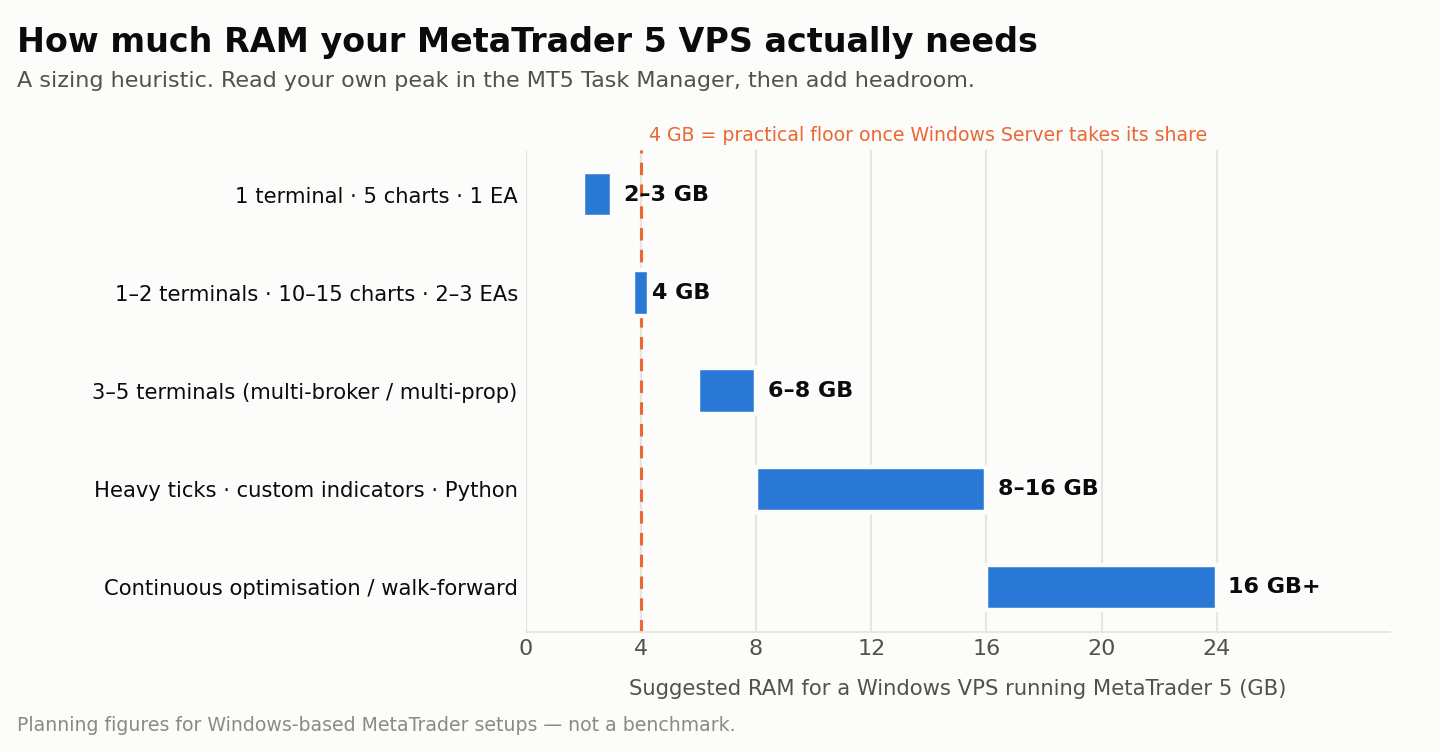
These are planning figures, not benchmarks. Your own Task Manager readings beat any table on the internet, including this one.
3. CPU: single-thread speed over core count
MetaTrader is largely single-threaded for chart and EA execution. A 12-core server with slow cores will run your EA worse than a 2-core server with fast ones. Core count only starts to pay off when you’re running many terminals in parallel, or using the MT5 Strategy Tester’s multi-core optimisation.
Practical translation: prefer providers that name a modern chip. QuantVPS specifies AMD EPYC on its DDR4 tiers and AMD Ryzen on its DDR5 tiers; a provider that won’t tell you what silicon you’re renting is usually renting you old silicon.
4. Uptime SLA — and what the guarantee is actually worth
This is where the best VPS for automated trading separates itself from the cheapest one, and where the marketing and the contract often disagree. Read the numbers carefully. ForexVPS.net advertises a “100% uptime guarantee” while its service level agreement sets a 99.99% minimum and excludes scheduled maintenance and force majeure. QuantVPS advertises 99.999%. Those figures translate to real downtime as follows:
| Advertised SLA | Maximum downtime per year | Per month |
|---|---|---|
| 99.9% | 8 h 46 min | 43.8 min |
| 99.99% | 52.6 min | 4.4 min |
| 99.999% | 5.3 min | 26 s |
The gap between 99.9% and 99.99% is the difference between a bad afternoon and a rounding error. What matters more than the percentage is the remedy: most providers refund a pro-rata slice of the monthly fee, which will never cover a position left open through an outage. Build your EA to survive a restart rather than trusting the SLA.
5. Windows licensing, backups and access
MetaTrader runs natively on Windows, so unless you’re comfortable with Wine or a Linux-native stack, you’re paying for a Windows Server licence. Specialist forex VPS providers bundle it. General-purpose hosts don’t: Contabo, for example, charges from $5.50/month extra for Windows Server, and that cost scales with your core count (Cybernews). A $6.60 VPS with a $5.50 licence and no broker proximity is not the bargain it looks like.
Also check for automated snapshots or backups, a dedicated IP (some prop firms and brokers care), and whether the provider offers a trial or money-back window. ForexVPS.net offers 14 days; MetaTrader VPS offers a 24-hour free trial.
How to measure your real latency before you buy
Do this before you shortlist anything. Every provider advertises a low number, and none of them is the number that decides the best VPS for automated trading in your case. Only one number matters: the round trip between that data centre and your broker’s trade server. Here’s how to find it in about ten minutes.
- Find your broker’s server address. In MetaTrader 5, open the Journal tab at the bottom of the terminal. On connection it logs the server name and IP address of the trade server you are actually connected to.
- Check the ping in-platform. The bottom-right corner of the MT5 window shows live ping to that server. Note it during the London and New York sessions, not at the weekend.
- Identify the data centre. Run the IP through any IP-geolocation lookup. You’re looking for Slough/London (LD4), Secaucus/New Jersey (NY4), Tokyo (TY3), Aurora/Chicago, or occasionally Amsterdam or Frankfurt.
- Test the candidate VPS from that region. Most providers publish looking-glass test IPs or test files per location. Ping the one matching your broker’s city.
- Take the trial. Install your terminal, connect to your live or demo account, and read the ping figure in the corner. That number is the only benchmark that counts.
If your broker is in LD4 and a New York VPS is cheaper, the cheaper server is still the wrong server.
Best VPS for automated trading in 2026: 7 compared
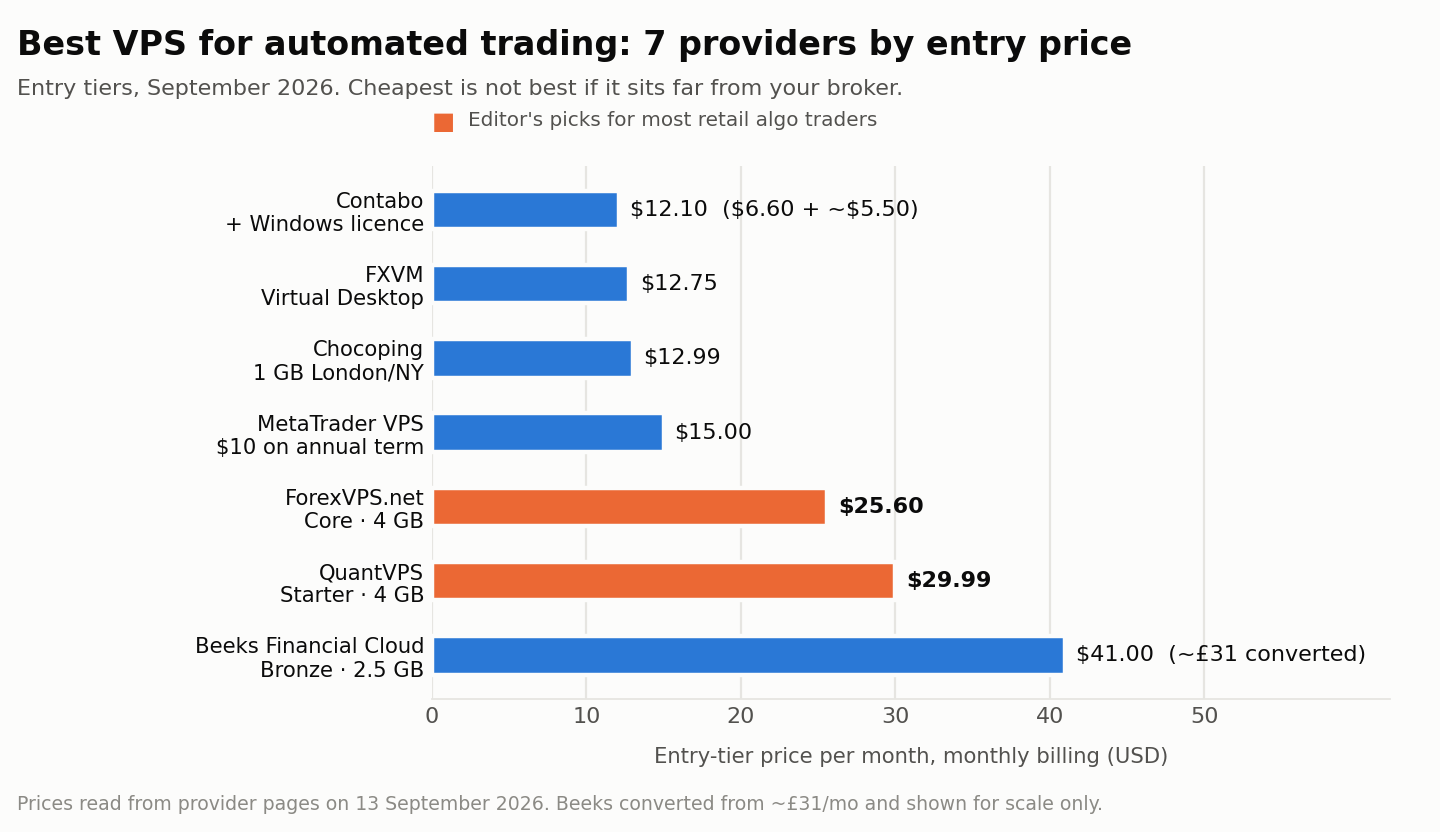
These are the seven candidates for the best VPS for automated trading at retail prices in 2026. Entry-tier plans, monthly billing, prices verified September 2026. Latency figures are the providers’ own advertised claims and should be verified on a trial, not taken at face value.
| Provider | Entry price/mo | RAM | Cores | Storage | Key locations | Advertised uptime | Best for |
|---|---|---|---|---|---|---|---|
| ForexVPS.net | $25.60 | 4 GB | 2 | 100 GB | 22 incl. London, NY, Tokyo, Zurich | 100% claim / 99.99% SLA | All-round retail algo trading |
| QuantVPS | $29.99 | 4 GB DDR4 | 2 (AMD EPYC) | 50 GB NVMe | Chicago + NY, London, Dublin, Frankfurt, Tokyo | 99.999% | Futures / CME algos |
| Beeks Financial Cloud | ~£31 | 2.5 GB | — | 30 GB | Major financial hubs, colocated | Enterprise SLA | Traders who want a listed, audited provider |
| MetaTrader VPS (MQL5) | $15 ($10 annual) | up to 3 GB | on demand | up to 16 GB | 30+ hosting points | 99.99% | Single MT4/MT5 terminal, lowest friction |
| Chocoping | $12.99 (1 GB) | 1–4 GB | 1–4 | 23–40 GB RAID10 | London, New York, Amsterdam | Not published | Budget London/NY proximity |
| FXVM | $12.75 (desktop) | 1.5–4 GB | 2 | 10–90 GB | 12–15 incl. London, NY, Chicago, Tokyo | 100% claim / 99.99% SLA | Cheap multi-terminal hosting |
| Contabo | $6.60 + ~$5.50 Windows | varies | varies | SSD / NVMe | 11 general-purpose regions | “SLA-backed”, % not published | Non-latency-sensitive bots, research boxes |
Entry-tier trading VPS plans compared, September 2026. Sources linked in each provider section below.
1. ForexVPS.net — best all-rounder
The Core plan is $25.60/month for 4 GB RAM, two cores and 100 GB of storage, with 22 locations included and roughly 35% off on annual billing. Higher tiers go to 6 GB/4 cores (Edge, $38.40) and 8 GB/6 cores (Prime, $51.20). Every plan bundles automated backups, a dedicated IP and a 14-day money-back guarantee (ForexVPS.net pricing).
For most readers this is the best VPS for automated trading on the list. It hits the sweet spot: enough RAM to stop worrying, enough locations that your broker’s hub is almost certainly covered, and a refund window long enough to actually test a strategy. The advertised “1 ms to forex brokers” is best-case marketing — treat the 14 days as your real benchmark.
2. QuantVPS — best for futures and CME-based strategies
QuantVPS is built around Chicago proximity, advertising 0.52 ms to the CME and a 99.999% uptime target. The Starter tier is $29.99/month for 4 GB DDR4 and two AMD EPYC cores on 50 GB NVMe; the DDR5 Ryzen line starts at $39.99. Pro sits at $99.99 for 16 GB and six cores, and a dedicated box runs $299.99 (QuantVPS pricing).
If you trade futures through NinjaTrader, Tradovate or Rithmic, this is the obvious choice. For a London-hosted forex broker it’s the wrong geography at a higher price — the global locations exist but Chicago is where the value is.
3. Beeks Financial Cloud — the institutional option
Beeks is a London-listed company selling the same colocated infrastructure to brokers and hedge funds that it sells to retail traders. Its retail Bronze tier runs about £31/month for 2.5 GB RAM, 30 GB storage and Windows Server 2022 (ForexBrokers.com).
You pay a premium for less RAM than the competition. What you’re buying is counterparty quality — audited accounts, a real support organisation, and infrastructure that institutions already vet. Worth it if a hosting failure would be materially expensive for you; overkill for a single EA.
4. MetaTrader VPS — cheapest credible option for one terminal
Ignored far too often, because it’s a button inside the platform rather than a website. MetaTrader’s own hosting costs $15/month on a one-month term, falling to $13 (3 months), $10.83 (6 months) and $10/month on 12 months. Each virtual machine gets up to 3 GB RAM and 16 GB of disk, with CPU allocated on demand, across 30+ hosting points and a 99.99% uptime figure. MQL5 states that 96% of broker servers are reachable in under 10 ms and 84% in under 3 ms, and there’s a 24-hour free trial (MQL5 VPS).
The two real advantages: migration is genuinely one click from the terminal, and moving your environment there doesn’t consume an EA activation — which matters if you bought a commercial robot with a limited licence count. The catch is that it hosts the MetaTrader environment only. No RDP desktop, no Python sidecar, no third-party tools.
5. Chocoping — budget proximity to London and New York
Four tiers, all in London, New York or Amsterdam: $12.99 for 1 GB, $14.99 for 2 GB, $22.99 for 3 GB and $31.99 for 4 GB, on RAID10 SSD with hardware-level virtualisation (Chocoping).
The London note on their site — that a large share of key brokers sit there — is the right instinct. Start at the 2 GB tier at minimum; the 1 GB plan will fight Windows for memory. No published uptime SLA is the main thing keeping it out of the top spot.
6. FXVM — cheap multi-terminal hosting
FXVM’s Basic tier is $29.75/month for 2.5 GB and 80 GB SSD across 15 locations, with Advanced at $42.50 for 4 GB. A cut-down “Virtual Desktop” runs $12.75 with 3 GB RAM but only 10 GB storage and a single terminal. Advertised execution is “under 5 ms” with a 99.99% SLA behind the 100% claim (FXVM).
Reasonable spread of locations — London, New York, Amsterdam, Tokyo, Chicago, Zurich, Frankfurt, Singapore, Mumbai, Sydney, Hong Kong, Seoul. Watch the storage on the cheaper tiers if you keep tick history.
7. Contabo — only if latency genuinely doesn’t matter
Contabo’s Cloud VPS 10 starts at $6.60/month monthly, or $3.96 on a 12-month term, with Windows Server from $5.50/month on top and pricing that scales with cores (Cybernews). Eleven general-purpose regions, none positioned for broker proximity.
This is a fine machine for a Python bot that polls a REST API every fifteen minutes, a backtesting box, or a research server. It is the wrong tool for tick-driven execution against an LD4 broker.
Which one should you pick?
There is no single best VPS for automated trading. There is a best one for your broker’s data centre, your terminal count and your budget — in that order.
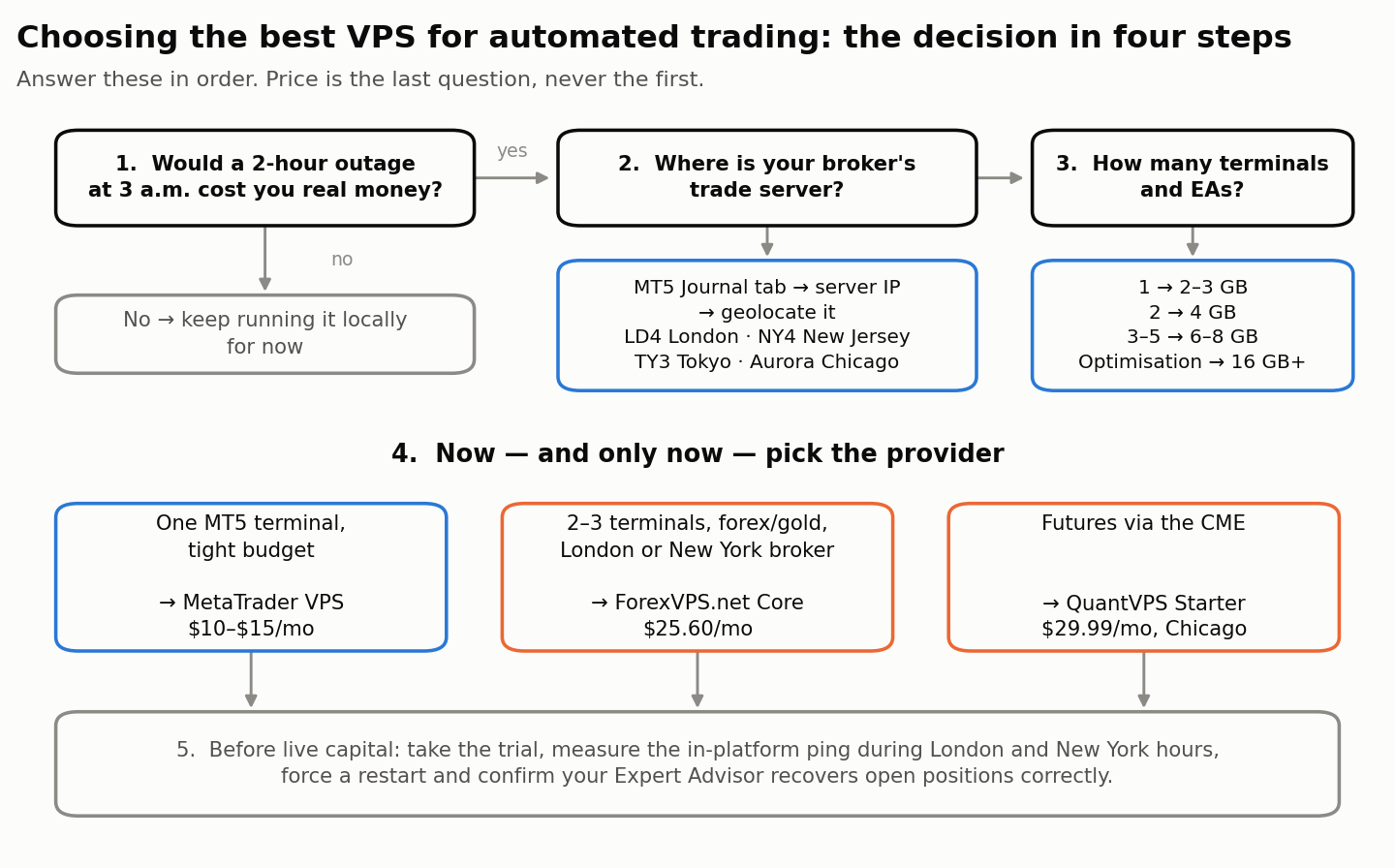
- One MT5 terminal, tight budget, EA licence limits: MetaTrader VPS at $10–$15/month. Start here; upgrade only when you outgrow it.
- Two to three terminals, forex/gold, broker in London or New York: ForexVPS.net Core at $25.60/month.
- Futures via CME: QuantVPS Starter at $29.99/month, Chicago region.
- Multiple prop firm accounts running in parallel: 6–8 GB tier — ForexVPS Edge ($38.40) or QuantVPS Lite ($59.99).
- Backtesting, optimisation, non-latency-sensitive bots: Contabo, plus a small proximity VPS for live execution.
- Failure would be materially expensive: Beeks.
Extra considerations for prop firm traders
If you’re running an EA on a funded or prop firm challenge account, the best VPS for automated trading is also the one that keeps you inside the rules: hosting decisions carry rules-compliance risk on top of technical risk.
- Check the firm’s stance on EAs and copy trading first. Policies differ sharply between firms and change without much notice. Read the current rulebook of your specific firm rather than a comparison article — including this one.
- Shared IPs across accounts can look like copy trading. Several firms restrict identical trades across multiple accounts. A dedicated IP is worth having.
- Match the VPS region to the firm’s broker, not the firm’s marketing address. A firm headquartered in Dubai may route through an LD4 broker.
- Test through a full news event before the challenge, not during it. A VPS that holds up on a quiet Tuesday can queue orders at an NFP release.
- Size for the challenge plus the funded account. You will end up running both terminals at once during the transition.
The 12-point setup checklist
Buying the best VPS for automated trading is only half the job — most failures happen in the setup afterwards. Work through this before you go live. Print it or grab the downloadable version.
- Broker trade-server IP identified from the MT5 Journal tab
- Data centre of that IP confirmed (LD4 / NY4 / TY3 / Aurora / other)
- VPS region matched to that data centre
- Ping measured in-platform during an active session, not at the weekend
- RAM sized from your own MT5 Task Manager peak, plus headroom
- Windows licence cost confirmed as included or added to the total
- Trial or money-back window noted with a calendar reminder
- Automatic Windows Update reboots disabled or scheduled to the weekend
- MetaTrader set to auto-start on boot, with auto-login enabled
- EA tested through a forced VPS restart — does it recover open positions correctly?
- Automated snapshot/backup enabled and one restore tested
- Alerting configured so you know within minutes if the terminal disconnects
Download the 12-point VPS setup checklist (PDF)
Five mistakes that cost people money
Buying on advertised latency. “1 ms to brokers” and “0.52 ms to CME” are best-case figures to a specific venue. Yours will differ. Measure on a trial.
Undersizing RAM to save $10. When Windows starts paging to disk, your EA’s tick handler stalls at exactly the moment volatility spikes. The saving is not worth it.
Leaving Windows Update on default. An unattended reboot at 04:00 with positions open is the most common self-inflicted VPS failure. Schedule it, or disable automatic restarts.
Never testing a restart. An EA that recovers state from open positions behaves very differently from one that assumes a clean start. Force a reboot on a demo account and watch what happens.
Assuming the VPS removes execution risk. It removes your connectivity risk. Slippage, requotes, spread widening and broker-side latency are unchanged. Even the best VPS for automated trading is infrastructure, not edge — the edge still has to come from the strategy and its risk controls.
Frequently asked questions
How much RAM do I need for a VPS running MetaTrader 5?
4 GB is the practical standard for one to two MetaTrader 5 terminals with 10–15 charts and a few Expert Advisors. Windows Server consumes a large share of anything smaller. Go to 6–8 GB if you run three or more terminals, and measure your actual peak with MT5’s built-in Task Manager before deciding.
Is a VPS worth it for automated trading?
Yes, if your EA needs to be live during hours you can’t supervise, or your home connection is unreliable. At $10–$30 per month, a single avoided outage usually pays for a year. It is not worth it for manual daily-chart trading or for an EA you can run on a desktop that’s already on.
Does a VPS make my trades execute faster?
It removes the delay between your machine and the broker, which can be 50–150 ms on a home connection and low single digits from a co-located data centre. It does not change broker-side processing, spread or slippage. Scalping and news strategies feel the difference; swing strategies mostly don’t.
Can I run MetaTrader 5 on a Linux VPS?
MetaTrader 5 is a Windows application. It can be run on Linux under Wine, and MetaQuotes publishes guidance for this, but it’s an unsupported configuration for live automated trading. Unless you have a specific reason, pay for the Windows licence — it’s typically $5–$10/month or bundled free with specialist forex VPS providers.
What’s the difference between MetaTrader VPS and a regular forex VPS?
MetaTrader VPS ($10–$15/month) hosts only your MetaTrader environment, migrated in one click from inside the platform, with no remote desktop. A regular forex VPS gives you a full Windows machine over RDP, so you can also run Python scripts, trade copiers, cTrader or a browser. Choose MetaTrader VPS for simplicity, a full VPS for flexibility.
Which is the best VPS for automated trading in 2026?
For most retail algo traders the best VPS for automated trading in 2026 is ForexVPS.net Core at $25.60/month — 4 GB RAM, two cores and 22 locations. Run a single MetaTrader 5 terminal on a budget and MetaTrader VPS at $10–$15/month is enough; trade CME futures and QuantVPS in Chicago is the better fit.
Do prop firms allow trading from a VPS?
Most do, and many traders running EAs rely on one. Rules vary by firm on copy trading, shared IPs and account-management tools, and they change. Check your specific firm’s current rulebook before you deploy, and prefer a plan with a dedicated IP address.
The bottom line
The best VPS for automated trading in 2026 is a boring decision made in the right order: find your broker’s data centre, match the region, size the RAM from your own measurements, then choose on price and refund window. Get that sequence right and any of the seven providers above will serve you well. Get it backwards — buying on advertised milliseconds and discovering the geography later — and you’ll pay more for worse fills.
Put another way: the best VPS for automated trading is rarely the cheapest and almost never the fastest on paper. It is the one whose location matches your broker, whose RAM matches your terminals, and whose refund window is long enough for you to prove both before the money is gone.
If you’re running a single MetaTrader 5 terminal, start with MetaTrader VPS at $10–$15/month and prove your EA survives a week of unattended operation. If you’re running several terminals or several prop accounts, ForexVPS.net Core at $25.60/month is the more comfortable floor. Either way, use the trial window to measure your actual ping instead of trusting anyone’s homepage — including this page.
Next step: run through the 12-point setup checklist before you deploy an EA to live capital, then read our guide to risk management for automated strategies and our notes on surviving a drawdown — because the fastest server in the world won’t save a strategy with no drawdown control.